The tools you use matter. Modern, well-built tools are the engine behind every great website. Jekyll One uses the latest versions of the most popular tools for the web. They are all open-source and free to use, with no licence fees for personal or professional projects.
Platforms
J1 Template runs on these popular software platforms:
All three are open-source, free to use, and work on every common operating system, including Windows, Linux, and macOS.
Ruby
For the latest versions of J1 Template (>= 2026.1.x), we recommend Ruby V3. The newest Ruby versions are much faster than older ones — Ruby 3 can be up to three times faster than Ruby 2.0. That clearly speeds up the work of building your new website.
Jekyll
The latest version is Jekyll v4.4.0 (January 2025). It includes all the fixes for the V4 series. The next version, v4.5, will bring new features and a more modern setup. As soon as it is released, we will add those new features to J1 too.
NodeJS
Websites built with Jekyll One are managed with NodeJS. Its built-in package manager npm makes managing a J1 project much easier. You get to use well-known commands that most software projects use, so they are quick to learn and easy to remember. Simple commands let you focus on the content instead of the tooling.
Frameworks
To save you from re-inventing the wheel, J1 Template uses ready-made frameworks, extensions, and modules. All built-in frameworks are industry standard, well known, and trusted around the world.
Bootstrap V5
Web Standards (HTML5, CSS, and JavaScript)
Icon Fonts
Fully Configurable
Bootstrap V5
Today’s web sites must be responsive and look modern. Jekyll One uses Bootstrap V5, one of the leading frameworks for building responsive websites today.
Web Standards
Standards bodies and professional websites set the rules for the web. Modern sites are dynamic, load fast, and offer many extra features. For the fastest loading, J1 automatically compresses all HTML, CSS, and JavaScript before publishing. Sites built with J1 Template also support AJAX loading, which lets parts of the page update without reloading.
For everyday work, you should focus on the following standards.
HTML5
HTML5 is today’s standard. It is a "living standard", which means the WHATWG (Web Hypertext Application Technology Working Group) keeps improving it over time.
The most important features today include:
-
Semantic elements such as
<article>,<section>, and<nav> -
Built-in form validation
-
Web Components (Custom Elements and Shadow DOM)
-
New input types (date, email, range, and more)
CSS3
CSS3 is today’s standard, and it is built in a modular way. Important modules and features include:
-
CSS Grid and Flexbox for layout
-
CSS Custom Properties (variables)
-
CSS Subgrid
-
CSS Nesting
-
CSS Color Level 4
-
CSS Cascade Layers
JavaScript ES15
ECMAScript 2024 (ES2024 / ES15) is the newest version of JavaScript. It was released in June 2024.
Icon Fonts
Icons matter. They make a website easier to understand. You will use icons in navigation menus, in extensions and modules, and in your content too.
J1 Template supports popular icon font sets out of the box:
-
Material Design Icons (MDI)
-
FontAwesome Icons V5 (FAI)
-
Iconify Icons (ICI)
These sets all have great designs and offer a wide range of icons in the categories most websites need.
Fully Configurable
Modern software is rarely simple to manage. To take that load off you, J1 is fully configurable. You do not need to dig deep into the code.
You just configure the parts you want to change.
carousel.yml)# --------------------------------------------------------------------------
# text--template-features (features page)
#
- show:
enabled: true
id: text--template-features
lightbox: false
type: text
text: [
"<big>Jekyll One Theme</big> </br> <i>Clean, ..</i>",
"<big>Jekyll meets Bootstrap</big> </br> <i>Best of ..</i>",
"<big>J1 is Open Source</big> </br> <i>No pain ..</i>",
"<big>Explore this site</big> </br> <i>Learn what's ..</i>",
"<big>Create modern static sites</big> </br> <i>Secure, ..<i>"
]
options:
autoPlay: 5000
singleItem: true
pagination: falseDevices
The web is everywhere. J1 Template works with modern web browsers on all kinds of devices, so your site looks great on PCs, tablets, and smartphones.
Desktop and Mobile support
Desktop Web Navigation
Mobile Web Navigation
Excellent Google Lighthouse Scoring
Desktop and Mobile support
The web has shifted from being mostly desktop to being mostly mobile. Just over a decade ago, in 2010, more than 90 percent of all global web traffic came from desktop computers. Today, mobile devices are in the lead. By July 2021, more than half of all web traffic came from mobile phones.
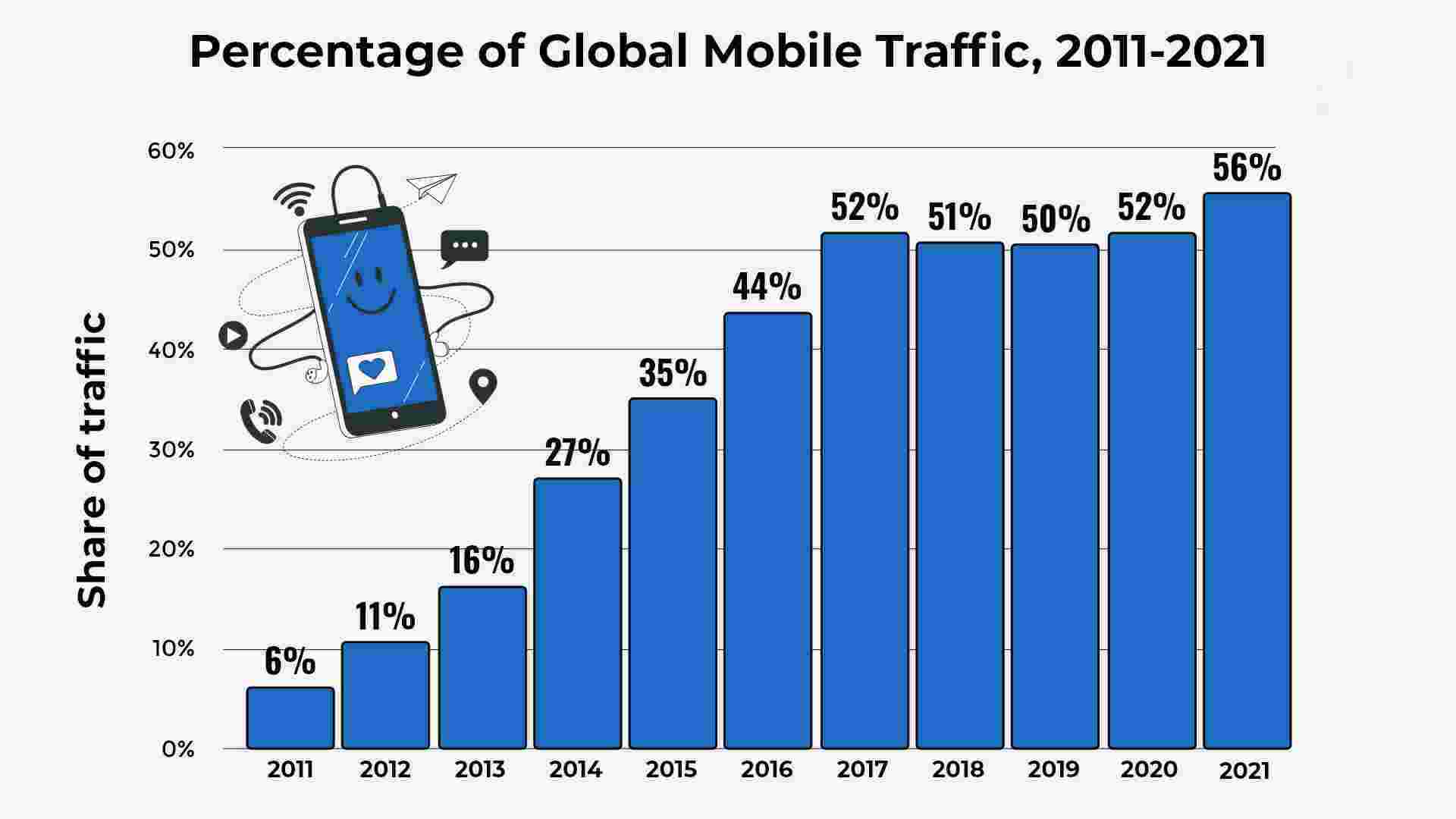
Source: broadbandsearch.net
Since 2021, more than half of all web visits come from a mobile device. That is why your site needs to work well on phones and tablets too.
Desktop Web Navigation
The Navigation Module in J1 Template comes with several smaller modules. One of the most important is the menu system. With a simple configuration, you can give visitors quick access to every content page on your site.
navigator_menu.yml)# ------------------------------------------------------------------------------
# Menu LEARN
#
- item: Learn
sublevel:
- title: Where to go
href: /pages/public/learn/where_to_go/
icon: paw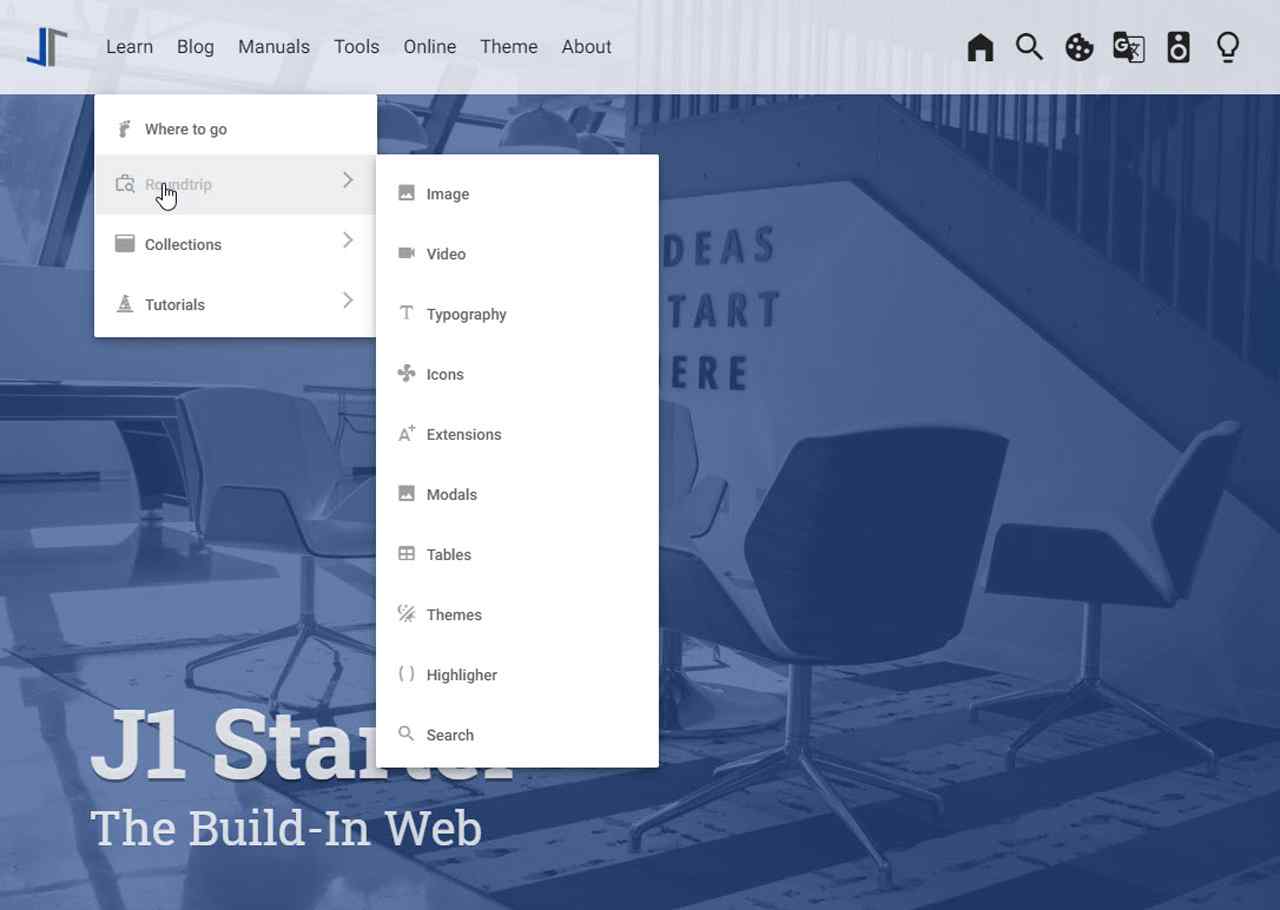
Mobile Web Navigation
Mobile devices are great for the apps that are made for them. Browsing regular websites on a phone can feel awkward. Jekyll One offers a navigation system that works well for both worlds: desktops and mobiles.
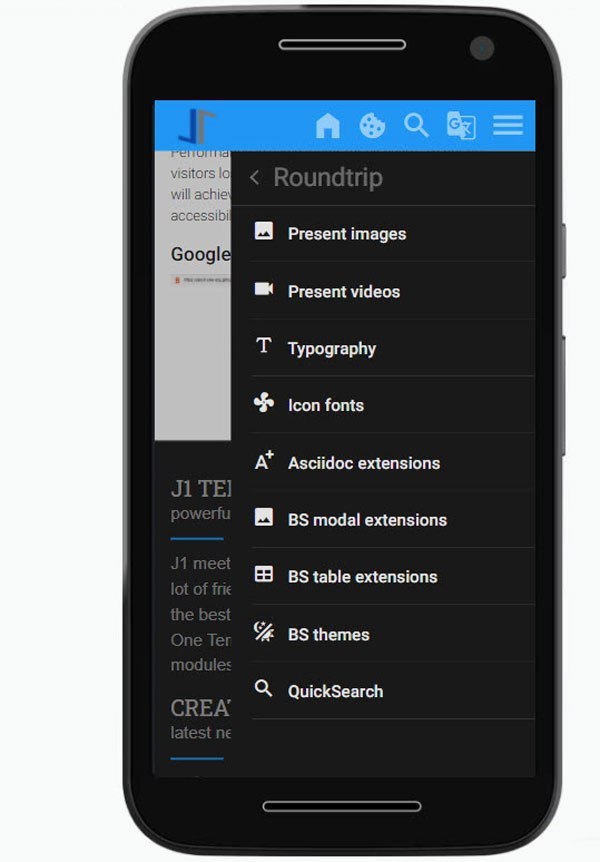
| Desktop and mobile navigation use the same configuration file ( |
Google Lighthouse
Performance matters to every visitor. To keep readers from leaving, J1 sites are highly optimised. They aim for the best Google Lighthouse scores in performance, accessibility, best practices, and SEO — all in the green range.
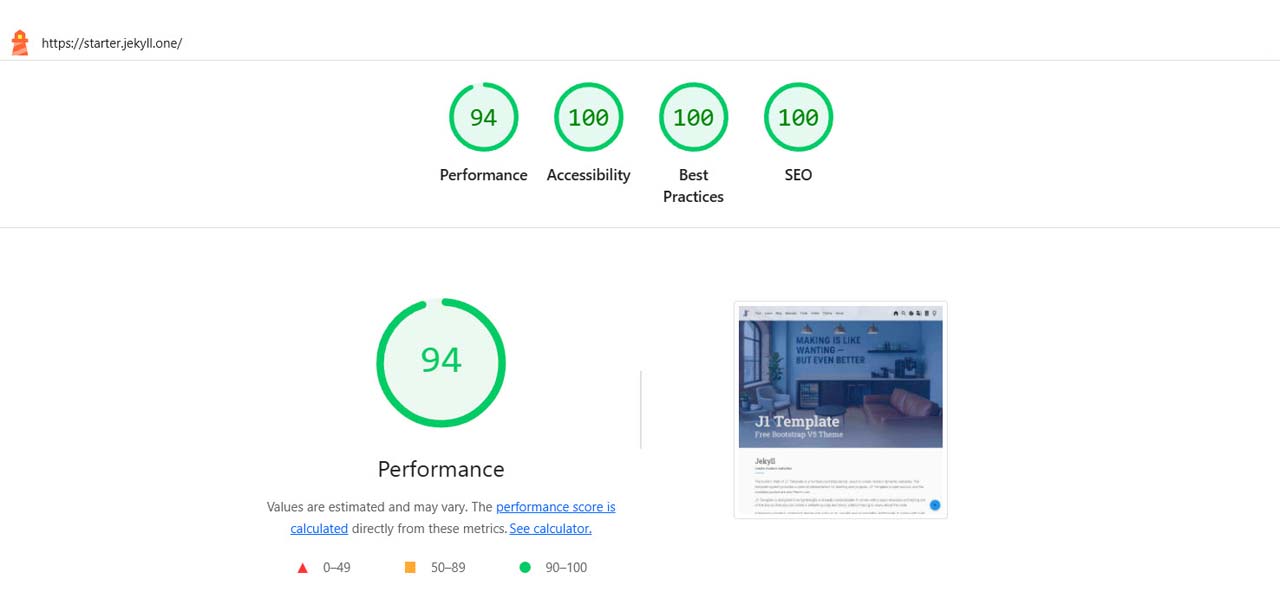
| Google Lighthouse scores depend on the browser version, so they may change a little from one test to the next. |