Optimizing the user experience you provide on your website is essential to the success of any online business. Google uses various user experience-related metrics to rank websites for SEO and continues to provide several tools to measure and improve web performance.
30 Minutes to read
Core Web Vitals
A metric is just a number that measures something - for example, how long a page takes to load. To make it easier to measure and compare the user experience of websites, Google has chosen a small group of standard metrics. These standard metrics are called Core Web Vitals, and they describe the real-world user experience of a page.
Core Web Vitals are a small set of web performance metrics introduced by Google. They focus on three key areas of the user experience:
-
Page loading - how fast the page becomes useful to the visitor
-
Interactivity - how quickly the page responds to clicks and taps
-
Visual stability - how much the page jumps around while it is loading
The Core Web Vitals metrics are:
-
First Contentful Paint (FCP):
FCPis the time it takes for the browser to draw the first piece of real content on the page (an image, a piece of text, an SVG, and so on). In other words, FCP is the moment the visitor first sees "something happening". A good FCP value is less than 1.8 seconds. (DOM here just means the structure of the page as the browser builds it - what it has actually drawn on the screen so far.) -
Largest Contentful Paint (LCP):
LCPmeasures the loading speed of the main content. It is the time it takes for the largest visible element (often a hero image or a big block of text) to appear in the visible part of the browser window. A goodLCPvalue is less than 2.5 seconds. -
Total Blocking Time (TBT):
TBTmeasures how long the page is "frozen" and cannot respond to clicks, taps or key presses. It adds up the blocking parts of all long tasks between First Contentful Paint and Time to Interactive. A task counts as "long" if it takes more than 50 ms. A goodTBTvalue is less than 200 ms in total. -
Cumulative Layout Shift (CLS):
CLSmeasures the visual stability of the page - in other words, how much the layout jumps around while loading. Jumps are annoying and can make a visitor click the wrong button. A goodCLSvalue is less than 0.1.
Excellent Core Web Vitals values take a lot of work to reach. Scores like the screenshot below need many rounds of optimisation work, and even then they can rarely be achieved.
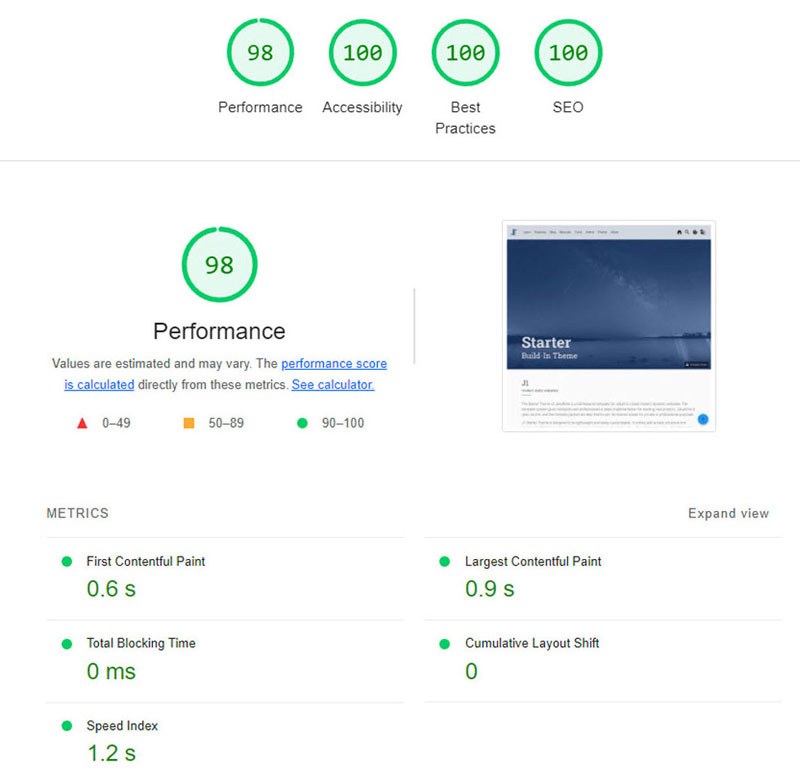
Even so, it is worth aiming for the best values you can get. Good scores improve your ranking - and, more importantly, your readers will appreciate the speed and come back for more.
J1 Template Build-in Optimizations
The template system already includes many optimisations that help your Core Web Vitals scores out of the box - you do not have to configure them yourself.
| A detailed description of each built-in optimisation is in preparation and will be added to this section in a future release of the tutorial. |
- First Contentful Paint (FCP)
-
Detailed description coming soon.
- Largest Contentful Paint (LCP)
-
Detailed description coming soon.
- Total Blocking Time
-
Detailed description coming soon.
- Cumulative Layout Shift (CLS)
-
Detailed description coming soon.
Optimize LCP
Largest Contentful Paint (LCP) is one of the Core Web Vitals metrics. It measures when the largest content element becomes visible in the browser. Other metrics like TTFB (Time To First Byte) and FCP (First Contentful Paint) also describe parts of the loading experience, but they do not show when the page becomes useful to the visitor.
Until the largest element is fully loaded, the page usually shows the visitor very little useful information. That is why LCP is a better match for what visitors actually expect. As a Core Web Vital metric, LCP counts for 25% of the total performance score - which makes it one of the most important metrics to optimise.
According to Google, the following types of elements are considered for Largest Contentful Paint:
-
<img>elements (images) -
<image>elements inside an<svg>element -
<video>elements (the poster image of the video is used) -
an element with a background image loaded via the url() function (as opposed to a CSS gradient)
-
block-level elements that contain text or other inline text elements
There are several ways to measure the LCP of your page. The easiest online tool is PageSpeed Insights.
Other Tools:
-
Google Chrome Developer Tools (Lighthouse)
-
Search Console (Core Web Vitals Report)
In its report, Google PageSpeed Insights shows you which element on your page was used to calculate the LCP.
Now that you know what LCP is and what target value to aim for, let’s look at how to improve LCP on your website. The underlying idea behind every technique below is the same: send less data to the visitor and spend less time sending and processing what is sent.
Optimizing Images
On most websites, the part of the page you see before scrolling (the above-the-fold area) contains a large image - usually a hero image, a banner, or a carousel. That image is often what the LCP measurement is based on. Optimising these images is therefore a key step in improving your LCP.
To optimise your images, a good option is to use a third-party image CDN (Content Delivery Network) such as ImageKit.io. A CDN is a network of servers spread around the world that delivers your files from a location close to your visitor. An image CDN also resizes and re-encodes images automatically to make them as small and as fast as possible.
The benefit is that you can focus on your actual business and leave image optimisation to a tool that is built for it. The image CDN keeps up with the latest improvements in image formats and web delivery, so you always get state-of-the-art performance with very little ongoing effort.
ImageKit is one example of a real-time image CDN. It works with existing cloud storage providers such as AWS S3, Azure or Google Cloud Storage, and it also has its own built-in storage and manager (the Media Library).
Here is how an image CDN can help improve your LCP score.
Images in Lighter Formats
ImageKit checks whether the visitor’s browser supports modern lighter image formats such as WebP or AVIF and serves the image in the smallest possible format automatically. WebP images, for example, are usually more than 30% smaller than the same image in JPEG format.
Automatically Compress Images
Beside converting to a better format, ImageKit also compresses your image so it takes up less space. It does this in a balanced way, so the image still looks good while becoming much smaller.
You can also change the level of compression (the quality) in real time, just by changing one parameter in the image URL. This makes it easy to find the right balance between visual quality and load time.
Real-time Transformations for Images
Google uses mobile-first indexing for almost all websites. That means it primarily looks at the mobile version of a site when deciding rankings. As a result, you should make extra sure that LCP is good on mobile devices. To do that, every image needs to be scaled down to exactly the size the layout requires.
For example, you usually need a smaller image on a product listing page and a larger image on the product detail page. Resizing the image to fit each page makes sure you do not send any more bytes than needed.
With ImageKit, you can transform responsive images in real time, just by adding the transformation to the image URL. For example, the image below is resized to a width of 200 px and a height of 300 px by adding height and width parameters to its URL.
Caching Images
An image CDN uses a global Content Delivery Network (CDN) to deliver your images. The CDN makes sure each image loads from a server close to the visitor, instead of from your own server which could be halfway across the world.
ImageKit, for example, uses AWS CloudFront as its CDN, which has over 220 delivery nodes worldwide. As a result, most images load in less than 50 ms. It also uses the right caching settings so that images are cached on the visitor’s device, on CDN servers, and even inside its own image processing network - which makes each later load even faster.
All of this helps to improve LCP on your website.
Client-side Optimization
Preload Critical Resources
Sometimes the browser does not prioritise loading a visually important image. A common example is a banner image above the fold (above-the-fold means visible on the screen before the visitor scrolls). If that banner is set as a background image inside a CSS file, the browser will only learn about it after it has downloaded and read the CSS file - which can be too late.
To help in such cases, you can preload the resource. Preloading just means: telling the browser early on, "you will need this file, so please start downloading it now". You do that by adding a <link> tag with rel="preload" to the <head> of your HTML.
<!-- Example of preloading -->
<link rel="preload" src="banner_image.jpg" />
You can preload more than one resource per page, but use this with care. Only preload the most important things: above-the-fold images or videos, fonts used across the whole page, and critical CSS or JavaScript files. Preloading everything would slow the page down instead of speeding it up.
Preconnect Third-party Origins
If your above-the-fold content depends on files (JS, CSS, images) hosted on a different domain, you can tell the browser to start the network connection to that domain as early as possible. This saves time when the file is actually requested. It is done with a <link> tag using rel="preconnect".
<link rel="preconnect" href="https://static.example.com" />With preconnect in place, the browser has already done the network handshake by the time it really needs the file, so the file arrives faster.
A subdomain (for example, static.example.com) of your main domain (example.com) also counts as a "third-party" in this context, even though it belongs to you.
For older browsers that do not support preconnect, you can use dns-prefetch as a fallback. It tells the browser to look up the IP address (this is called DNS resolution) of the third-party domain ahead of time, even if it cannot do the full connection handshake yet.
Compress Text Files
Compression means using a clever algorithm to make a file smaller without losing its content - like ZIP-ing a file. Any text-based file you send to the browser (HTML, CSS, JavaScript, SVG, JSON, API responses …) should be sent in compressed form. The two most popular algorithms today are gzip and Brotli. Compression shrinks the data the browser has to download, which directly lowers the LCP.
Remove Render-blocking Resources
When the browser receives the HTML page, it starts reading the DOM tree (the structure of the page). If the HTML refers to an external CSS file or JavaScript file, the browser usually has to stop and wait for that file before going further. These files are called render-blocking resources, and they push the LCP back.
Here are some ways to reduce the blocking time of JS and CSS:
Remove Unnecessary Bundles
Do not send big JavaScript or CSS bundles to the browser if the page does not need them. A bundle is a single file that combines many smaller code files together. If a CSS rule can wait, or a JavaScript feature is not used on this page, there is no point in loading it up front - it just blocks the render.
If you cannot split a particular file into smaller bundles, but it is not critical for the page, you can add the defer attribute to its <script> tag. With defer, the browser continues to read the rest of the page and runs the script later. The script no longer blocks rendering, so the LCP goes down.
Use Inline CSS
Critical CSS is the set of style rules needed for the part of the page that is visible at first (the above-the-fold area). If you put those rules directly into each HTML tag (using the style attribute - this is called inline CSS), the browser does not have to wait for an external CSS file before drawing them. It can render the page right away, which lowers the LCP.
Minify Content
Minifying means removing all unnecessary whitespace and comments from a CSS or JavaScript file before sending it to the browser. Humans need the whitespace to read the code; the browser does not. A minified file is smaller, so it downloads faster, which lowers the LCP.
Compression (covered above) uses algorithms to shrink the file further as it travels over the network. The two main compression algorithms today are Gzip and Brotli. Brotli usually compresses better than Gzip and is now supported by all major browsers, servers and CDNs.
Server-side Optimization
On the server side, many things happen before the page even reaches the browser: database queries, page assembly, calculations, and so on. It is worth checking your server logs for bottlenecks - points where the server slows down. A bottleneck might be a slow database query, or the time it takes to build the page itself.
Common best practices include caching database responses and pre-rendering pages, both of which reduce the time the server needs to respond.
If the server is still too slow after those steps, you may simply need more server capacity to handle the number of incoming requests.
Reduce Response Times
If your server is slow to respond, every page-speed metric - including LCP - will suffer. Here is how to bring server response times down.
Content Delivery Network (CDN)
We have already seen above that an image CDN such as ImageKit shortens the load time for your images. Your visitors get those files from a CDN server close to them, in milliseconds.
You can do the same thing for the rest of your site. Putting your static files (JS, CSS, fonts) on a CDN speeds up their load time just as much. ImageKit also supports static content delivery through its servers.
You can also try to put your HTML pages and your APIs behind a CDN, so that the responses themselves are cached on the CDN servers. This is more complex than caching static files, because HTML and API responses can change often - but when it works, it gives the biggest speed boost of all.