J1 in a Day is a tutorial that teaches you how to build modern websites with the J1 Template. It walks you through the basics of Jekyll and J1 step by step. The goal is simple: by the end of the day, you understand the most important ideas behind a modern static website and you have built one.
We recommend this tutorial for everyone — whether you have built websites before or you are starting from zero. Jekyll works very differently from classic Content Management Systems (CMS) such as WordPress, so even experienced web authors will find new ideas here.
A whole day may sound like a lot of time. It is. You will find many "Learn something in 15 minutes" articles on the Internet, but a quarter of an hour is only enough to take the very first steps. To really understand how Jekyll and J1 work together, plan for a full day. The time is well spent.
Jekyll ships with a built-in starter theme called Minima. A website created from Minima is intentionally very simple — it shows you that Jekyll works, but it does not show what a static site generator can really do. J1 is different: it gives you a full-featured website out of the box, with navigation, search, image galleries, blog support, and much more.
Before you can take full advantage of everything J1 offers, you need to know a handful of technical terms and components. This chapter introduces them. A few minutes here will save you a lot of time later when you start building your own site.
5 Minutes to read
All Chapters
Find here an overview on all chapters this tutorial:
You are here — Meet & Greet
A awesome Site
Development System
Project Management
Creating Content
Jekyll
Jekyll was first released in 2008 by Tom Preston-Werner, one of the co-founders of GitHub. Today the project is led by Parker Moore together with a motivated team. Jekyll is a tool written in the Ruby programming language. It builds static websites from a few simple ingredients: templates, partials, Liquid tags, and markup files such as Asciidoc or Markdown.
Jekyll is delivered as a Ruby gem — that is the standard packaging format for Ruby libraries. The same gem can be used on the command line as a stand-alone program, or it can be integrated into a larger Ruby application. Inside J1, Jekyll is the central tool that generates every page of your website.
To produce the final HTML, Jekyll reads your content (written in Asciidoc or Markdown) and combines it with shared page parts (written using the Liquid templating language). The result is a complete website ready to be served by any web server. Because Jekyll does not use a database to build pages on demand, the term static is sometimes misleading: you can still load data into your pages, but the data comes from simple files in standard formats such as YAML, JSON, CSV, or TSV.
What is a static site?
A static site is a website where every page is already prepared as a ready HTML file on the server. When a visitor opens the page, the server just sends that file directly — no extra work needed.
This is very different from a system like WordPress, which builds each page from a database every time someone visits. Because a static site delivers the same prepared HTML file to every visitor, the response is fast and inexpensive to host.
Over the past few years static sites have become much more popular. There are two main reasons: developer tools (programming languages, libraries, build systems) have become much better, and businesses want websites that are faster than what a classic database-driven site can deliver.
Static page access
A static site generator like Jekyll prepares all the pages of a website ahead of time, before anyone visits. That does not mean Jekyll has to rebuild your entire site from scratch every time you change something. Modern generators support incremental builds: when you edit a single page, only that page (and any pages that depend on it) is rebuilt.
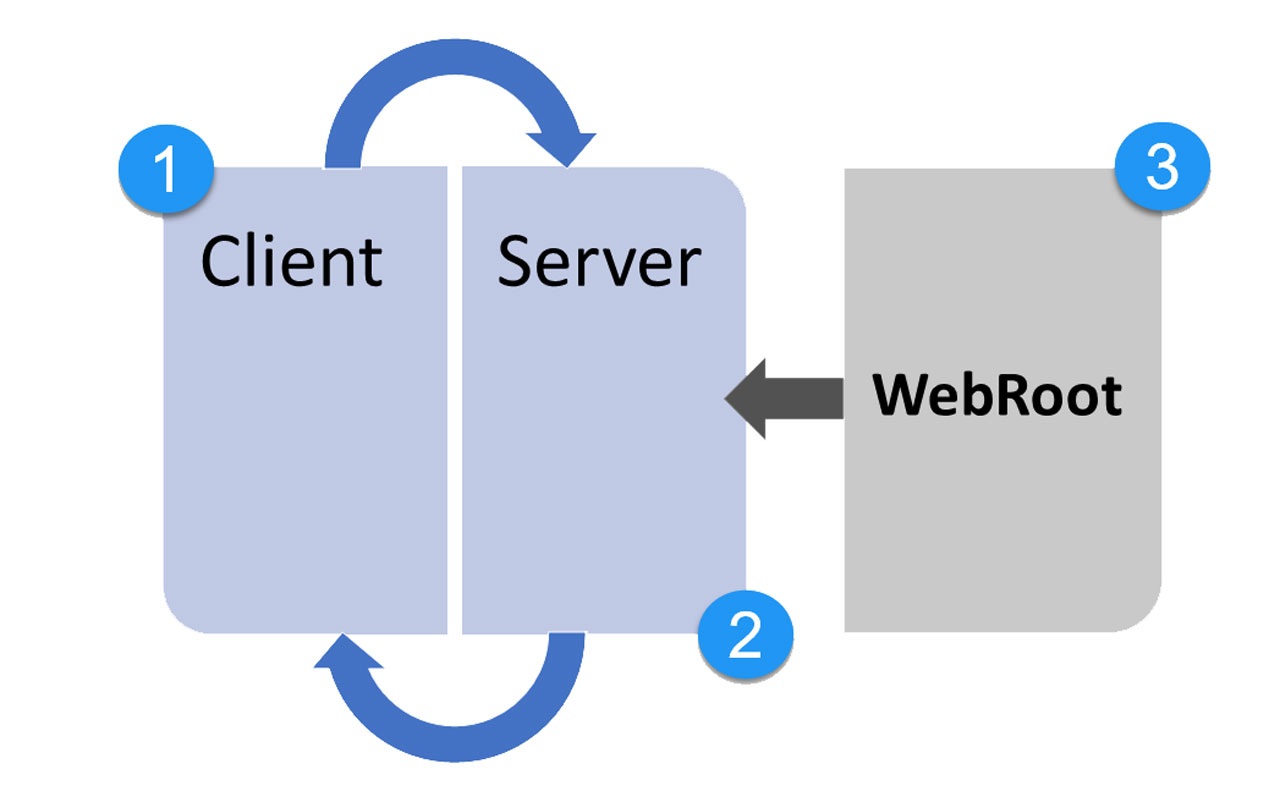
Web Browser
Web Server
Server-side rendered (prepared) static content
Content Management System (CMS)
A CMS (Content Management System) is a software application for creating and publishing digital content. When the content in question is a website, the system is usually called a Web CMS (WCMS). Well-known examples are WordPress, Joomla, and Drupal.
A WCMS lets several people create, edit, and publish website pages from one shared place. This central approach is a big advantage for large web projects such as enterprise sites. It does, however, require a substantial software stack on the server: a database to store the pages and a rendering engine to turn database records into HTML on demand.
Dynamic page access
A typical CMS-driven website builds every page on demand. The server fetches the content from a database, hands it to a template engine, adds the required CSS styles and any JavaScript components, and only then sends the finished HTML to the visitor. Every page is assembled fresh for every request.
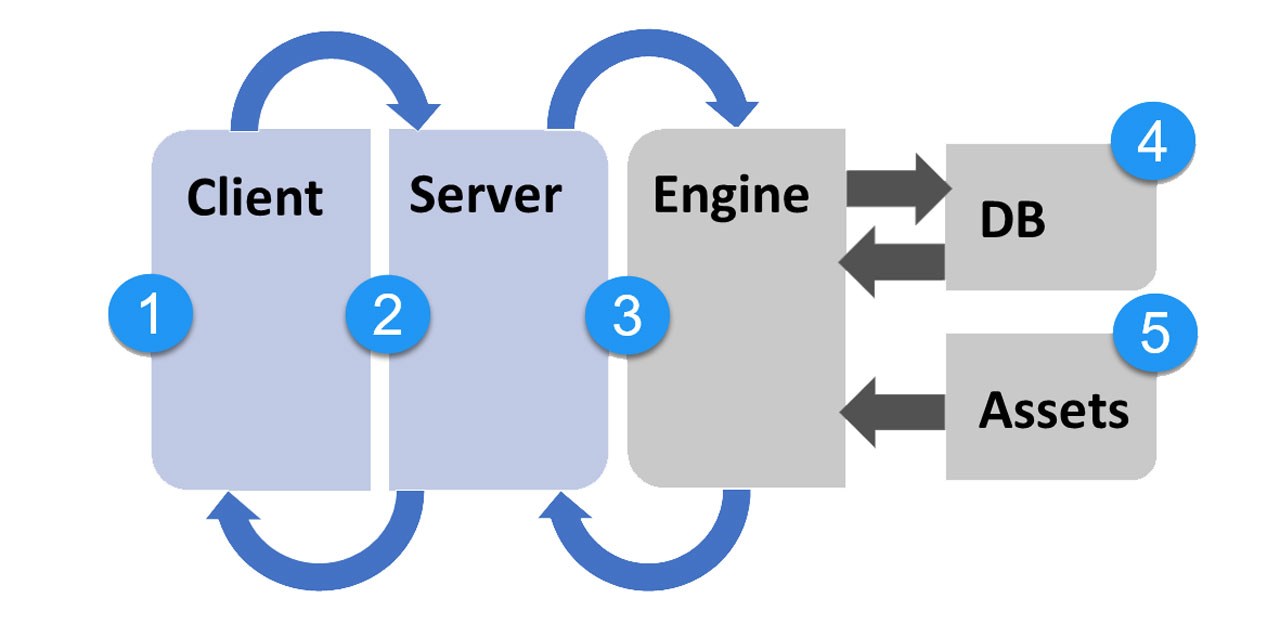
Web Browser
Web Server
Rendering Engine (e.g. PHP-based)
Database (e.g. MySQL, Postgres)
Static content (Images, Videos, JS- and CSS files) and Caches
J1 Theme
J1 Theme (or just J1) is a boilerplate for websites built with Jekyll. Although the underlying delivery model is static — every page is a real HTML file prepared in advance — J1 websites feel dynamic to visitors. This combination is the heart of the JAMstack approach.
On one hand, a J1 site is a pure static site: a folder of HTML files plus supporting assets (JavaScript, CSS, images, fonts) that any web server can hand out directly. On the other hand, J1 has no moving server-side parts. There is no PHP, no database, and no rendering engine waiting on the server to assemble pages.
Everything dynamic in a J1 site comes from JavaScript running in the visitor’s browser and from external APIs called from that JavaScript. The Jekyll build step prepares all of these JAM components (JavaScript, APIs, Markup) ahead of time. The result is a website that loads quickly and behaves like a modern web app.
Netlify platform
Netlify provides everything you need to host fast, modern websites built by static site generators like Jekyll (and many others such as Next.js, Hugo, Gatsby, and 11ty). The platform offers powerful features such as continuous deployment and serverless functions — features that make a real difference to the quality of your website.
Netlify is one option for putting a J1-based website on the Internet. Running a site on Netlify is easy to manage, very fast, and free for most small to medium sites.
Content Delivery Network (CDN)
A Content Delivery Network (CDN) is a network of servers spread out across the world. Its job is to deliver your website to every visitor quickly and reliably, by serving the files from a server that is geographically close to that visitor. The CDN keeps copies of your files (a cache) on each of its servers so the data does not have to travel halfway around the world.
The JAMstack approach makes CDNs especially useful. Because every HTML file, CSS file, and JavaScript file is already fully prepared, the CDN can deliver them directly without any extra processing on the server.
This is one of the main reasons static sites are so much faster than traditional CMS-driven sites: the CDN can serve a complete website straight out of its cache, with no database query and no template rendering involved.
Github platform
GitHub is a code hosting platform that uses the version-control system Git to track and manage source files. It lets developers, writers, and other contributors work together on projects from anywhere in the world. Millions of developers and companies build, ship, and maintain their software on GitHub every day.
Jekyll is also the engine behind GitHub Pages, a free GitHub service that hosts websites directly from a GitHub repository. J1-based projects are typically tracked with Git, so storing them on GitHub is a natural fit — especially for public projects and small teams.
The JAMstack
The JAMstack is a way of building websites and web applications using three ingredients: JavaScript, APIs, and Markup. At first that sounds trivial — after all, most modern web technologies use some of these. The point of the JAMstack is how the three are combined, not that they are involved.
JAMstack is a philosophy or approach, not a specific software bundle. It does not require any particular tool. In that respect it is different from something like the LAMP Stack, which names exact technologies (Linux, Apache, MySQL, PHP). The JAMstack just describes how you build a site, not which tools you must use.
JavaScript
JavaScript (JS) is the programming language that runs inside every modern web browser. It is what makes a web page dynamic — what lets a page respond to your clicks, load new content without reloading, animate elements, or run small calculations. In the JAMstack approach, JavaScript is the runtime layer that brings static HTML pages to life in the visitor’s browser.
APIs
An API (Application Programming Interface) is a defined way for two pieces of software to talk to each other. Think of it as a contract: "if you send me this request, I will send you that information back."
On the web, APIs are usually called by JavaScript running in the visitor’s browser. The JavaScript can call a local API to add extra items to the current page, or it can call a remote API (somewhere on the Internet) to fetch live data — for example, a translation service that converts your page to another language on the fly.
Markup Language
A markup language (ML) is a machine-readable way of describing both the structure and the formatting of a text. You write your text as usual and then mark certain parts with short tags — for example, to say "this is a heading" or "this is a list".
The point of markup is to keep the structure of your text separate from how it is finally displayed. The same marked-up text can be processed in different ways:
-
a web tool can turn it into HTML for the browser
-
another tool can turn it into a PDF document
-
yet another can prepare it for a printer
You write the document only once, in a neutral form, and the tools take care of producing each output format.
J1 Theme uses markup languages heavily to generate the HTML, CSS, and JavaScript files of your website. In line with the JAMstack approach, all your marked-up text is processed up front, so the resulting files can be delivered directly from a CDN.
Summarized
A lot you’ve learned, time to summarize what is behind. The last chapter should help with that. The section Summarize offers some handy sections to remember what has been presented in this chapter. And giving an outlook of what could be done next, an overview of all chapters of this tutorial, and useful links to learn more.
See all sections below:
Recap — What has been done, what’s explored in current section
What Next — Find to go further, what’s planned next
All Chapters — The full chain, all chapters
Further Reading — List of helpful links to get more
Recap
This first section was a bit theoretical. However, one should be familiar with the functions of the tools, such as the terms of the JAM stack. As the tutorial progresses, the relationships between the components will become more complex. Then it will be helpful to assign individual components or work steps to the technical terms.
Without knowledge of technical terms, searching for information on the Internet will be quite difficult. You now know the most important terms. Using technical terms should also make searching the Internet easier.
What Next
Well done, folks. All the basics and technical terms were learned that are needed to create and publish the first website on the Internet. And that will only take a few minutes.
Unbelievable? Then go to the next section. Here is shown how to do it!
Go for A awesome Site.
All Chapters
Find here an overview on all chapters this tutorial:
You are here — Meet & Greet
A awesome Site
Development System
Project Management
Creating Content
Further Reading
Reading this chapter is not essential for working on the project first time. Additional links will be helpful to learn more. The references point to important sources of manufacturer documentation. Here you can find out all the possibilities what the products can offer. Experiences from others are extremely important when dealing with software and more complex projects. Links to other sites may answer common questions from the experience of professionals. Here you can think far outside the box of a project currently worked on.
Further links in the current section: